- Click Start
- In the search field type Regedit and hit Enter
- Expand the following registry entry: HKEY_CURRENT_USER\Software\Microsoft\Windows NT\CurrentVersion\Windows Messaging Subsystem\Profiles.
- You will see a list of your profiles.
- Right click on the profile that you want to copy and click Export (Fig.1.).
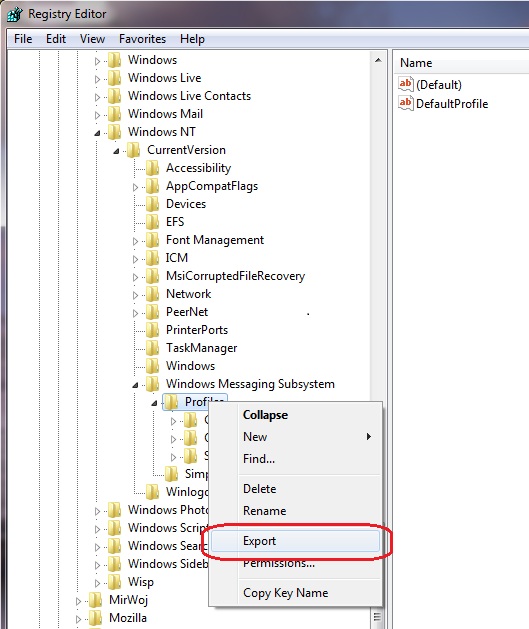
Fig.1. Exporting Outlook profiles from the Windows Registry Editor.
- Then, you can specify the name of the registry file and the location to save it e.g. Desktop.
- Now, you need to copy the file to another computer and double click it there.
- Confirm that you want to make changes to the registry.
- After you run your Outlook, the new profile will be opened (if you have only one) or you will be prompted to choose one of profiles (if you have more than one).

